 ← Grupo Aprecisa · Connecting those who know with those who need
Newsletter “A Chave e o Porteiro” (The Key and the Doorman) · No. 1 · Cybersecurity in plain language
The address, the key and the doorman
Domains, subdomains, secrets and what NIS2 requires, explained with a real case, without jargon
Gaspar do Amaral · 26 October 2026
Translated from the Portuguese original. This version was issued on 27 October 2026.
On this site, this article has been
Sunday, six in the evening. Everything seemed ready. On the websites of a small company I work with, anyone who wanted a PDF had to leave their email address, and the document was sent by email. For the articles, it worked. For the music, it did not: the files downloaded without asking anyone for anything.
The program was right. What was wrong was where a key had been put. It had been left in the safe of room 101, and the guest asked for it at the reception desk of room 102.
This article uses things everybody knows (a letter, a block of flats, a hotel, a cash machine) to explain five ideas that anyone needs before commissioning, designing or protecting a website: the address, the key, the doorman, the stamped ticket and which way you fall when something fails. At the end, it shows why all of this is exactly what the European cybersecurity law, NIS2, asks of companies.
This is issue no. 1 of the newsletter “A Chave e o Porteiro” (The Key and the Doorman), about cybersecurity in plain language. At the end I explain who it is for, how to read it and the road map for the next issues.
To remember. You do not need to know anything about computers to read this article. If you can post a letter, use a cash machine and leave your coat in a cloakroom, you already know the essentials.
1. The address: the building, the floor and the room
When you write a letter to your grandmother, you write the address from the most specific to the most general: the name, the street, the flat, the town, the country. The postman reads it the other way round: first the country, then the town, then the street, and only at the end the door.
Internet addresses work in the same way. Look at this one: artigos.exemplo.pt/musica/cancao/.
- .pt is the country (or the category, such as .com).
- exemplo is the building. Together, exemplo.pt is called the domain: it is the address the company bought and nobody else may use, like a plot entered in the land registry.
- artigos. is the floor. It is called a subdomain: a floor with its own door and doorbell, inside the same building. It is written before the domain, separated by a dot.
- /musica/cancao/ is the room on that floor. It is called the path and it is written after the domain, separated by slashes.
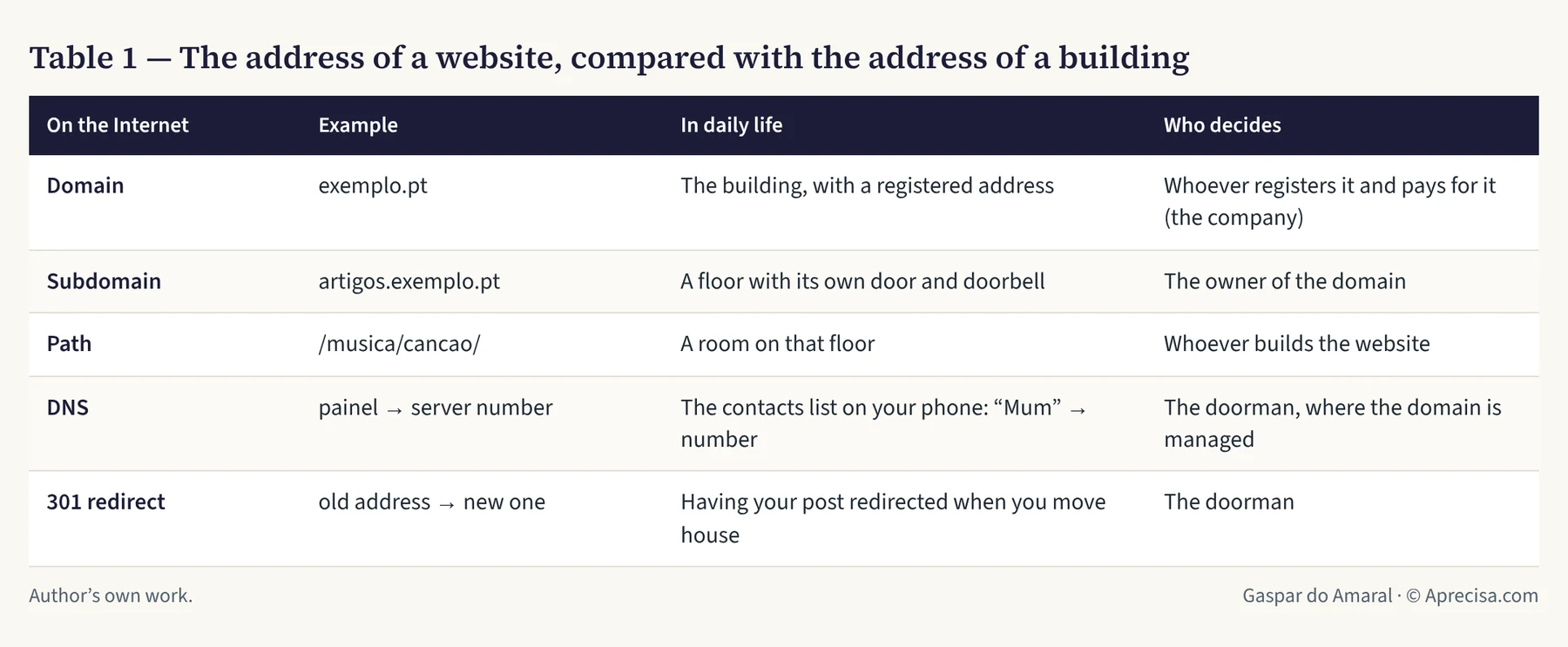
Table 1 puts these pieces side by side.
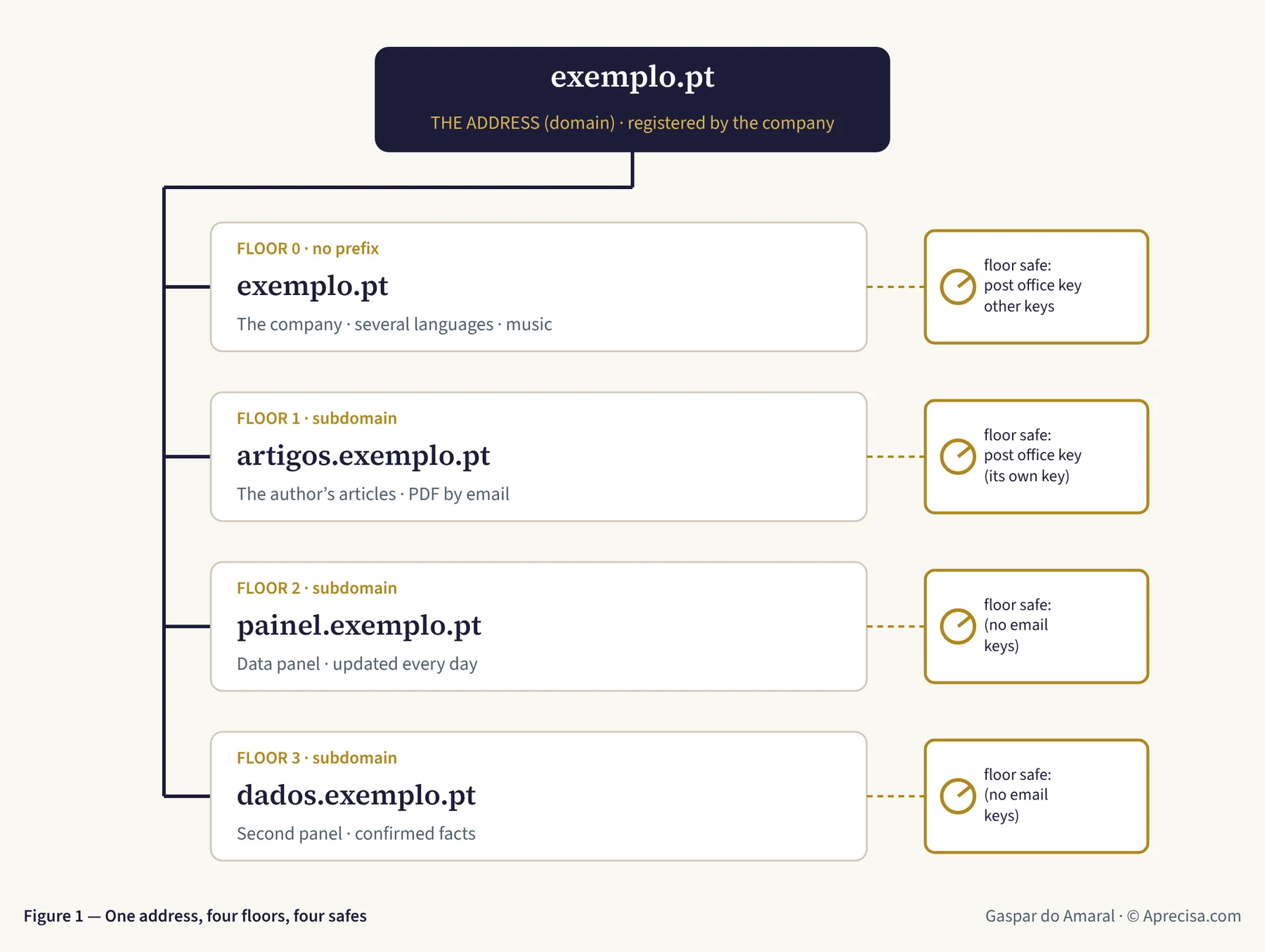
What Figure 1 shows. At the top is the building, exemplo.pt. Below it are four floors: the company’s floor (no prefix), the floor with the author’s articles, a data panel and a second panel. Next to each floor there is a safe. What is kept in one safe does not appear in the others, just as in a hotel the safe in room 101 does not open with the code for room 102. This is good, because if someone breaks into one room the others stay locked. But it means each key must be put in the safe of the room that is going to use it. That is where we went wrong on Sunday.
Who knows where each floor is? The contacts list on your phone
On your mobile phone you tap “Mum” and it dials the number. You do not need to know the number by heart. On the Internet, that contacts list is called the DNS: when you type painel.exemplo.pt, the DNS looks up the number of the computer that holds that floor and connects you to it. Opening a new floor means adding a contact to the list.
To remember. Domain = the building. Subdomain = the floor. Path = the room. DNS = the contacts list that turns names into numbers.
2. Before drawing: the architect’s five questions
Nobody builds a house by starting with the colour of the walls. First you ask who will live there, where people come in, where the valuables are kept, who has the keys and where you get out if there is a fire. A website is the same.
- Who is each floor for? One floor per audience. The company’s website, an author’s articles and a data panel serve different people. If they are all on the same floor, building work on one disturbs the others.
- Where do people come in? Each page has a single official address. When it moves to another room, a notice is left, like asking the post office to redirect your letters when you move house. On the Internet this is called a 301 redirect: anyone who has the old address, in a PDF, an email or an old post, always reaches the new one.
- What is kept under lock and key? Everything that is read stays open, like a shop window. What people take home (a PDF, a music pack) is handed to whoever leaves their email address, like the guarantee slip that is only made out to someone who gives their name.
- Who keeps the keys? Never the website’s code. The code is read by several people and tools, like the plans of a house that are shown to the builders. Writing a key into the code is taping your house key to the plans.
- Which way do you fall when something fails? This is the question almost nobody asks. It is the one that caught us out on Sunday, and section 6 is devoted to it.
3. The key: a PIN that does not belong to a person
To send an email in the name of [email protected], the website does not walk to the post office. It hands its letters to an email sending service, which we call the post office. The post office stamps each letter with an electronic seal of the domain, so that Gmail or Outlook know that the letter really comes from the company and not from an impostor.
The post office does not accept letters from just anyone. It asks for a key: a long string of letters and digits, like a very long PIN. Whoever has it can send letters in the company’s name. That is why it is called a secret. It is a PIN that belongs not to a person, but to a program.
A good secret follows four rules, and all of them already exist in our daily lives. Table 2 shows them.
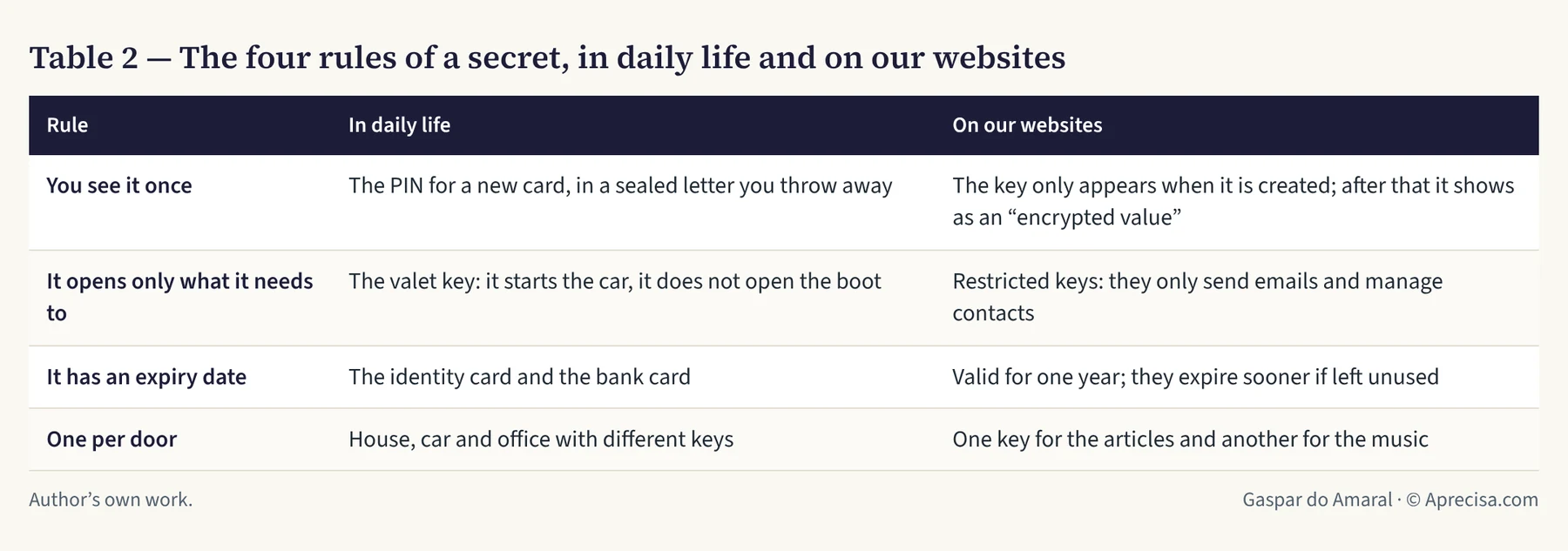
- You see it once. The PIN for a new card arrives in a sealed letter; you memorise it and throw the letter away. The post office key also appears only at the moment it is created. If it is lost, you do not ask for a copy: you make a new one and cancel the old one. The doorman does the same: once stored, the key appears only as an “encrypted value”, and not even its owner can read it again.
- It opens only what it needs to. When you leave your car with a hotel valet, you give them the key that starts the engine, not the one that opens the glovebox and the boot. Our keys do two things: send emails and manage contacts. They cannot touch payments or delete the account.
- It has an expiry date. Your identity card and your bank card have expiry dates. Our keys are valid for one year and stop working sooner if they go unused for a long time. A key forgotten in a drawer eventually dies on its own.
- One per door. Nobody uses the same key for the house, the car and the office. The articles have one key and the music has another. If one has to be cancelled, the other keeps working.
To create the new key, the post office also asked for a six-digit code generated on a mobile phone. It is what happens at the cash machine: you need to have the card and to know the PIN. This is called two-factor authentication. Anyone who steals the password but not the phone is left outside the door.
To remember. A secret is a PIN for programs: you see it once, it opens only what it needs to, it has an expiry date and there is one for each door. To create it, you need the phone in your hand.
4. The doorman: the hotel reception desk
The service that hosts and protects the websites, which we call the doorman, plays the part of a hotel reception desk. It receives everyone, at any hour, from any country, and decides what to do with each visitor.
- It gives everyone the room they asked for, that is, the page. It keeps copies of the pages at reception desks spread around the world, so that they open quickly in Lisbon or in São Paulo.
- It keeps one safe per room. On each floor there is a list of “variables and secrets”, kept separately for the hotel in operation (Production) and for the rehearsal room (Preview).
- It has staff who run errands: small programs, called “functions”, that go to work when a guest asks for something special, such as receiving a PDF by email. They are the ones who open the safe and use the key.
- It applies the house rules at the door: the change-of-address notice (301), the padlock on the address (HTTPS) and the list of what each page may or may not load.
There is one detail that is hard to grasp. Changing what is in the safe does not change anything straight away. The doorman only starts using the new key when the website is published again. It is like changing the locks of a hotel: the room cards only start to work once reception reprograms them.
To remember. The doorman receives the visitors, keeps one safe per floor and has staff who use the keys. A new key only counts after the website has been published again.
5. The stamped ticket: how a PDF is delivered by email
Think of the cloakroom at a theatre. You leave your coat and receive a ticket with a number and a stamp. At the end, you hand in the ticket and get your coat back. No ticket, no coat; and a ticket drawn by hand, without the house stamp, is worth nothing.
Delivering a PDF by email is a cloakroom. Figure 2 shows the seven steps.
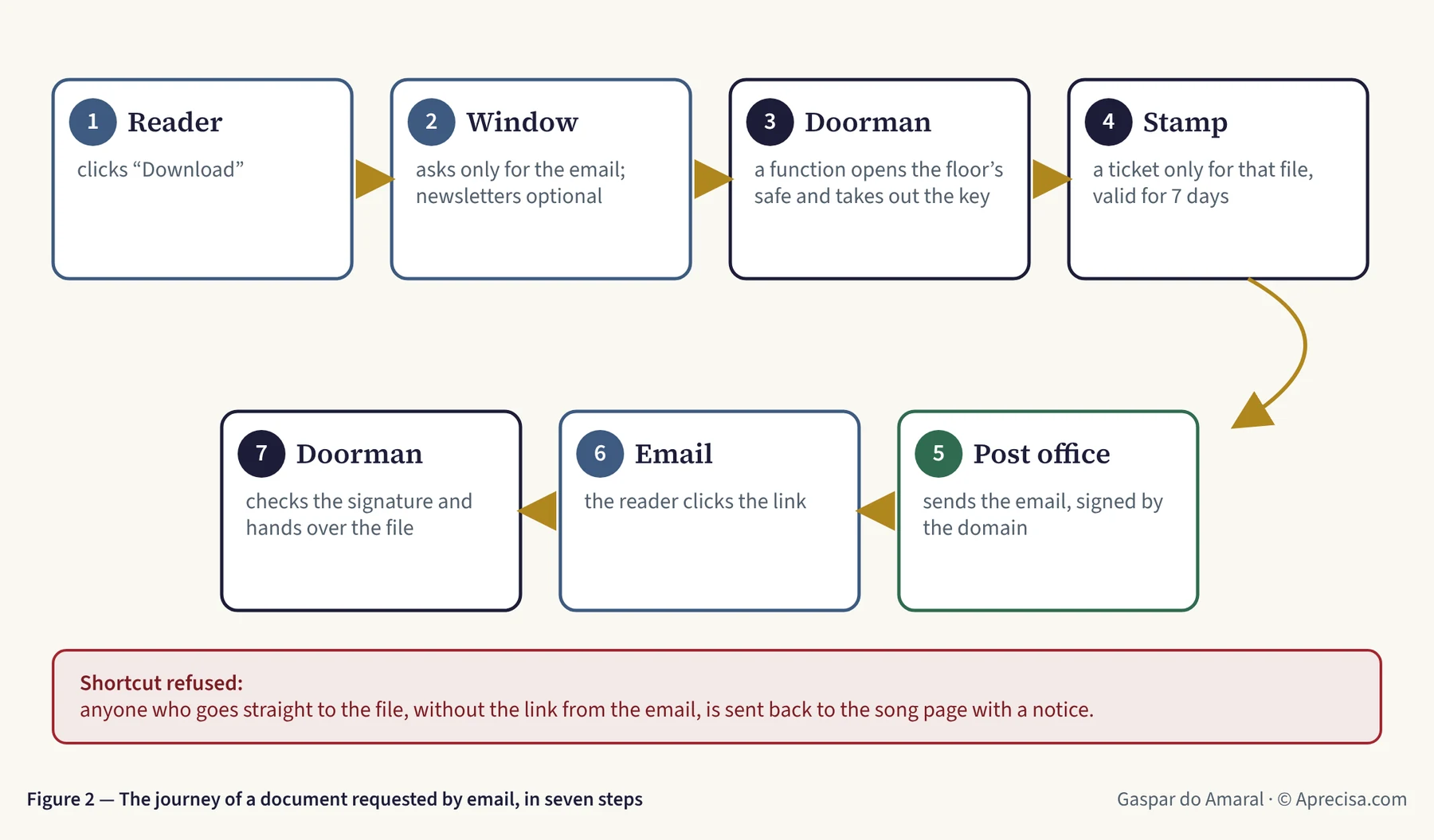
What Figure 2 shows. (1) The reader clicks “Download”. (2) A window opens that asks only for the email address; the newsletters are optional and come unticked. (3) The request reaches one of the doorman’s staff, who opens the floor’s safe and takes out the post office key. (4) The staff member prepares the stamped ticket: a link that only works for that file and is valid for seven days. (5) The post office sends the email, with the domain’s seal. (6) The reader clicks the link in the email. (7) The doorman checks the stamp and only then hands over the file. Anyone who tries to go straight to the file, without the ticket, is sent back to the page with a notice.
Why nobody can forge the stamp: the calculations, step by step
The stamp is a string of 32 characters, calculated from the name of the file, the expiry date and a secret that only the doorman knows. Each character can be one of 64 symbols: 26 capital letters, 26 small letters, 10 digits, the hyphen and the underscore.
- Each character has 64 possibilities. 64 = 2 × 2 × 2 × 2 × 2 × 2 = 26. In computer language, each character is worth 6 “bits” (6 yes-or-no questions).
- 32 characters are worth 32 × 6 = 192 bits.
- The number of possible stamps is 2192, about 6.3 × 1057: a 6 followed by 57 digits.
- Imagine a machine that tries a thousand million (109) stamps per second, non-stop, for the 7 days the ticket is valid. A week has 7 × 24 × 3,600 = 604,800 seconds. In total, 604,800 × 109 ≈ 6.0 × 10¹⁴ attempts.
- The probability of getting it right is 6.0 × 10¹⁴ ÷ 6.3 × 1057 ≈ 1 × 10−43: zero point, followed by 42 zeros, and then a 1.
To give you an idea: the whole Earth has about 1050 atoms. There are so many possible stamps that they could number every atom of 47 million planet Earths. Guessing the right stamp is like picking, blindfolded, a single atom in those 47 million planets. And it is about 200 times less likely than winning the EuroMillions jackpot five weeks in a row.
To remember. Security does not come from hiding the file. It comes from the stamp being impossible to guess without the secret, just like a cloakroom ticket without the house stamp.
6. Which way you fall: the lesson from Sunday
Think of two kinds of door. The emergency exit of a cinema must open when the power goes off: nobody can be trapped inside. The barrier at a level crossing must come down when the power goes off: better a car waiting than a car on the line. The first one fails open; the second one fails closed. Neither is wrong. What is wrong is to swap them.
On Sunday, the post office key was in the safe on the articles floor. The music lives on another floor, the company’s floor. When a reader asked for a music pack, the staff member on that floor opened their safe, found no key and answered “sending by email is switched off”. The window had been designed like an emergency exit: so as never to leave the reader with nothing, it handed over the file directly. A safe that behaved like an emergency exit.
Two things were corrected:
- The key went into the right safe. The company’s floor now has its own key, created just for it, with the same two permissions and the same expiry date.
- The files now fail closed. If the email cannot go out, the file does not leave by another door: the reader sees “It was not possible to send it now. Please try again in a few moments.” And without the stamped ticket, the doorman does not open the door, not even to someone who knows the name of the file.
Along the way there were two mistakes, which are worth telling because they are the most common ones. The first: the post office has two kinds of key, just as there are front-door keys and letterbox keys. They look the same and they do not open the same thing. The second: when you do not know whether a stored key is the right one, you do not try to guess. You make a new one and paste it straight into the safe, like someone who changes the lock when they do not know who has copies. A key of doubtful origin is not used.
To remember. Doors for people fail open. Safes fail closed. Before you design anything, ask which kind each door is.
7. And NIS2: what does it have to do with this?
NIS2 is the European cybersecurity law: Directive (EU) 2022/2555 of the European Parliament and of the Council of 14 December 2022 on measures for a high common level of cybersecurity across the Union. In Portugal it arrived through Decreto-Lei n.º 125/2025, de 4 de dezembro (Decree-Law No. 125/2025 of 4 December), the new Legal Framework for Cybersecurity, in force since 3 April 2026. The supervisor is the Centro Nacional de Cibersegurança (CNCS, Portugal’s National Cybersecurity Centre).
Think of the MOT test for cars. It is compulsory for some vehicles and not for others. But anyone with sense checks the brakes even when the law does not require it. NIS2 is similar: it applies to “essential” and “important” entities in the sectors it lists (energy, transport, health, water, digital infrastructure, information technology services, digital service providers, among others) and, as a rule, leaves out micro and small companies. The company that runs these websites is a micro-enterprise and, in principle, is not currently subject to NIS2 (a technical conclusion, to be confirmed by a lawyer: the decree-law covers some entities regardless of size, such as certain domain name providers and trust service providers).
So why comply? For three reasons.
- Because it is good engineering, and it costs almost nothing when it is done from the start, like fitting earthed sockets when the electrical wiring is installed.
- Because customers will demand it. NIS2 requires the entities it covers to monitor the security of their suppliers. A hospital already asks its catering supplier for a food hygiene certificate. A port, an energy operator or a hospital will ask their IT suppliers for proof of cybersecurity.
- Because one day it will go wrong. And on that day, the difference between “the key was in the right safe, with an expiry date and minimum permissions” and “the key was in the code” is the difference between a scare and a disaster.
Article 21(2) of the directive lists ten measures, in points (a) to (j). Table 3 sets them next to what has already been done and what is still missing. It is not a declaration of conformity: it is an honest progress report, which serves as a work list.
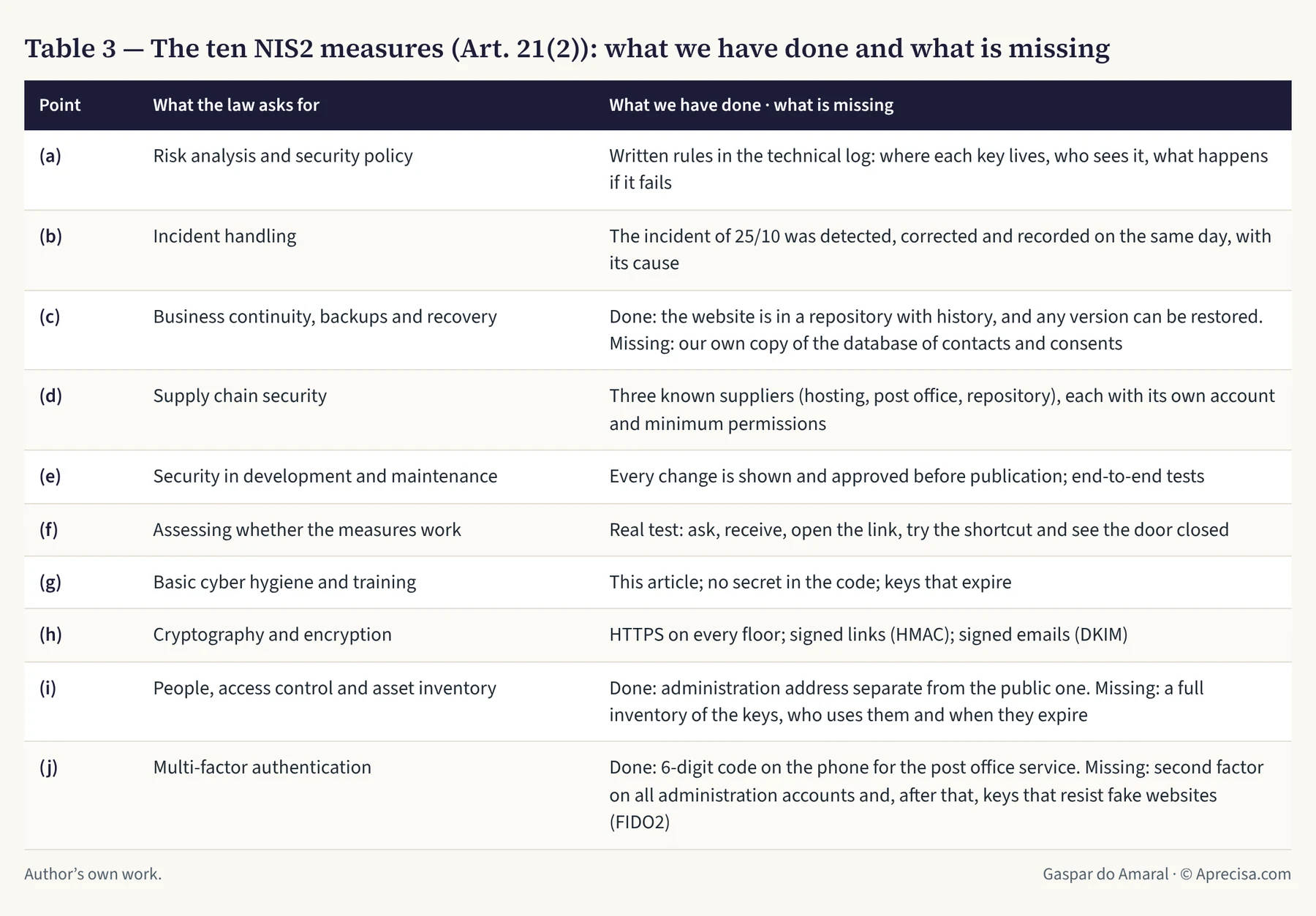
For those who are covered, there are deadlines for reporting significant incidents to the CNCS: an early warning within 24 hours of detection, an update within 72 hours and a final report within 30 working days after the impact ends. It is like car insurance: reporting an accident has a deadline. Fines for essential entities go up to €10 million or 2% of worldwide turnover, whichever is higher.
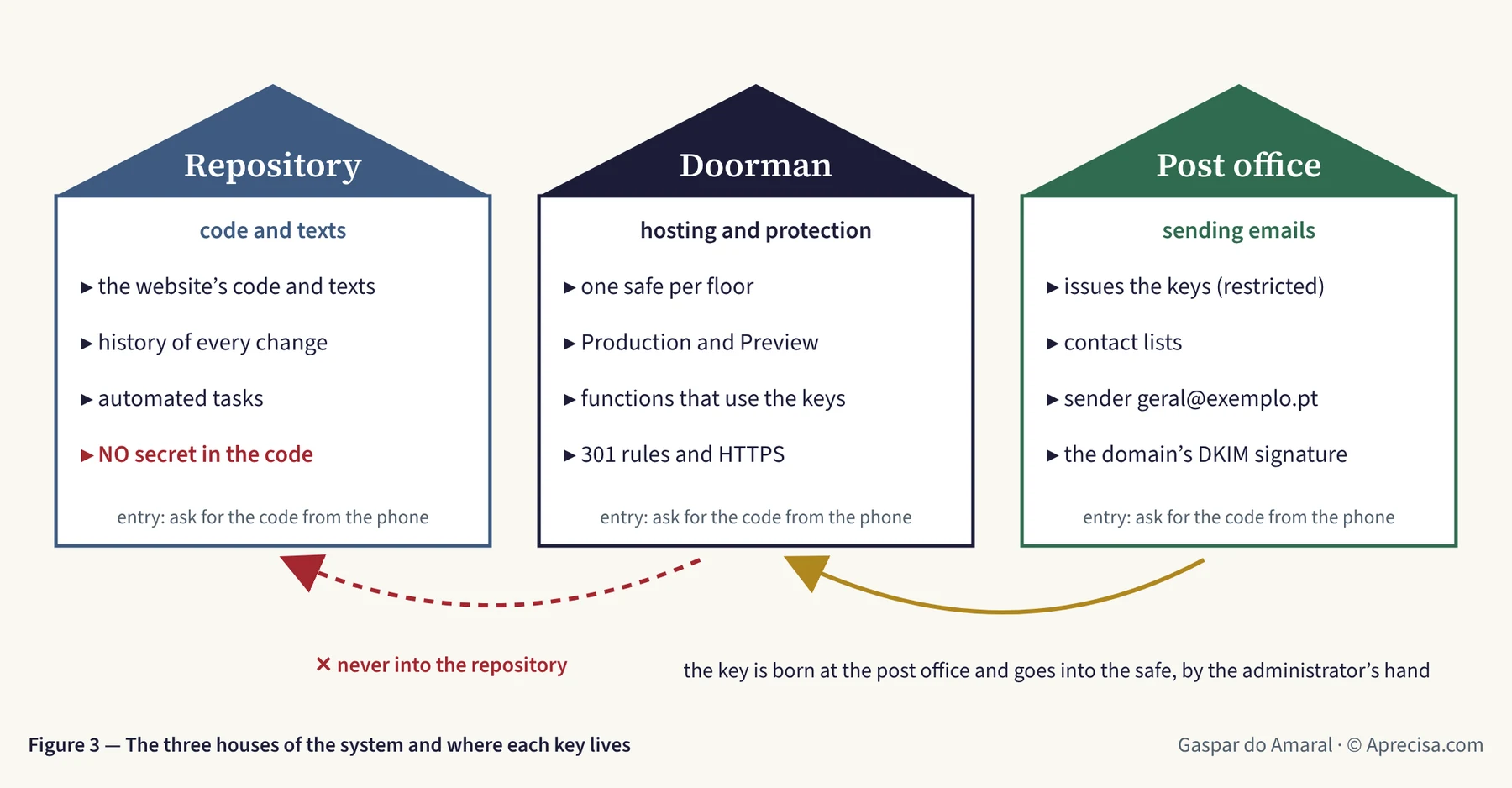
What Figure 3 shows. The three houses where the system lives. On the left, the code repository: the plans of the house, with the history of all the building work, which several people read, and so with no secret inside. In the centre, the doorman: the reception desk, with one safe per floor. On the right, the post office: the one that issues the keys, keeps the contact lists and seals the letters with the domain’s name. The arrows tell the journey of a key: it is born at the post office, goes into the doorman’s safe by the administrator’s hand, and never passes through the plans. To get into each of the houses, the second factor, the code from the phone, should be required.
Who plays each of these roles? There are many suppliers, in several countries. Table 5 gives examples for each role, so that readers recognise the names when they come across them. They are illustrative examples, in alphabetical order, with no recommendation.
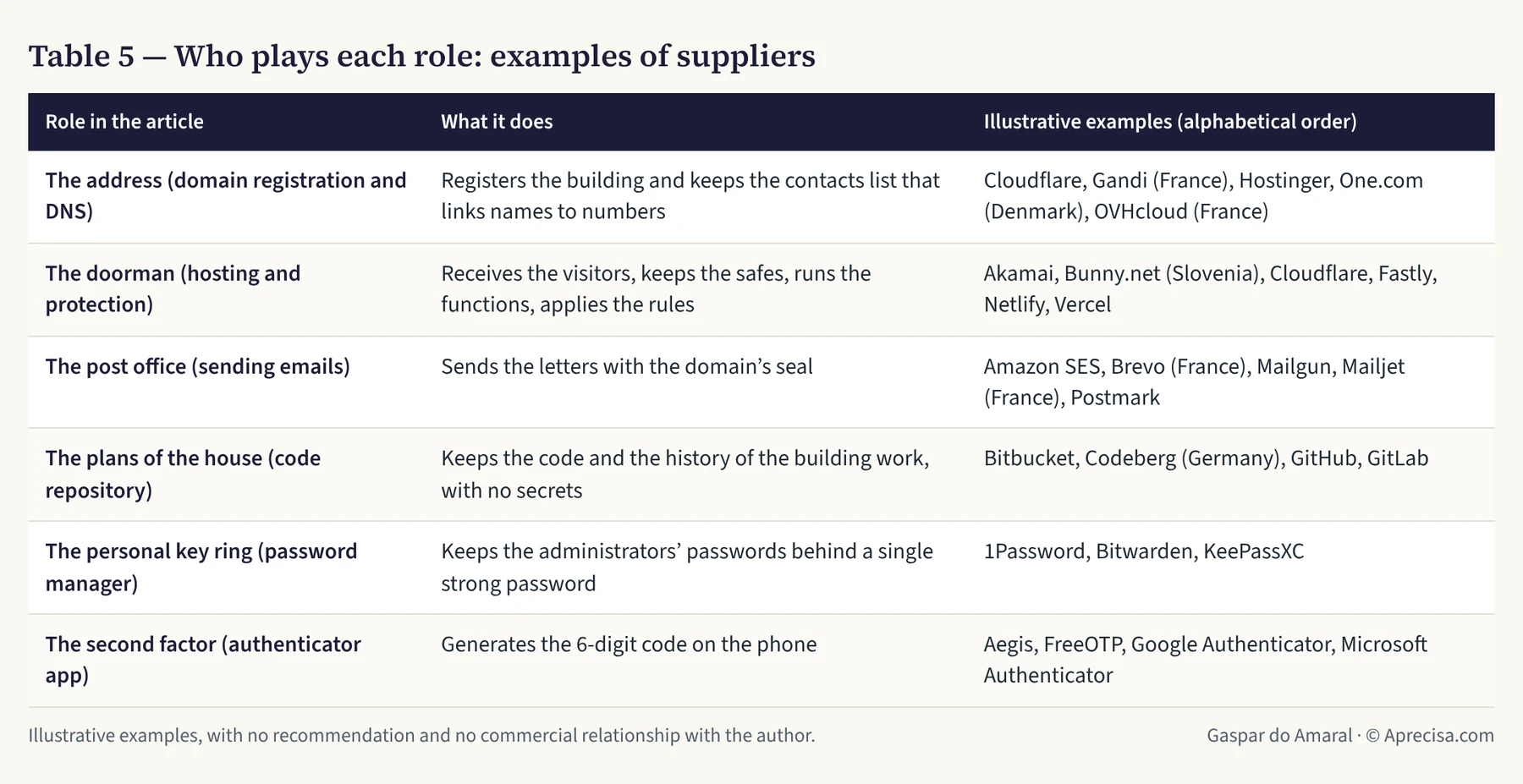
How to choose. Not by the name, but by what each one guarantees: where it keeps the data (inside or outside the European Union, which matters under the GDPR and NIS2), which second factor it requires to log in, and whether it allows keys with minimum permissions and an expiry date. It is like choosing a bank: what matters is not the logo, it is the safe.
8. What I proposed to the authority, and why it still matters
There is a difference between what the law requires and what engineering advises. Portugal’s Highway Code says the limit is 120 km/h; it does not say how fast to drive in fog. That judgement is left to the driver.
On 14 April 2026, during the public consultation on the regulation that puts Decreto-Lei n.º 125/2025 into practice, I submitted ten proposals to the CNCS, published in the article “Da Conformidade Normativa à Resiliência Operacional: 10 Propostas para o Novo Regime de Cibersegurança” (in Portuguese: From regulatory compliance to operational resilience: 10 proposals for the new cybersecurity framework). The consultation ran from 10 March to 22 April 2026 and received contributions from 56 organisations and individuals. In the final report, in June, all ten were classified as “Não acolhido” (not accepted). I gave an account of the outcome in the article “O Novo Regime de Cibersegurança: o que ficou por fazer” (in Portuguese: The new cybersecurity framework: what was left undone).
The facts, without adjectives. The CNCS gave three arguments for the refusals: the regulation already sets mandatory and comprehensive minimum measures; their verification follows the principle of proportionality; and each entity may adopt stricter measures according to its own risk analysis. Six of the ten proposals (1, 2, 4, 5, 8 and 9) were also put forward, in other words, by operators and manufacturers of critical infrastructure. Three (6, 7 and 10) were submitted by me alone. And on one point, the training of specialist staff (control PR.FC-2, at the heart of Proposal 9), the text did end up changing, through other contributions.
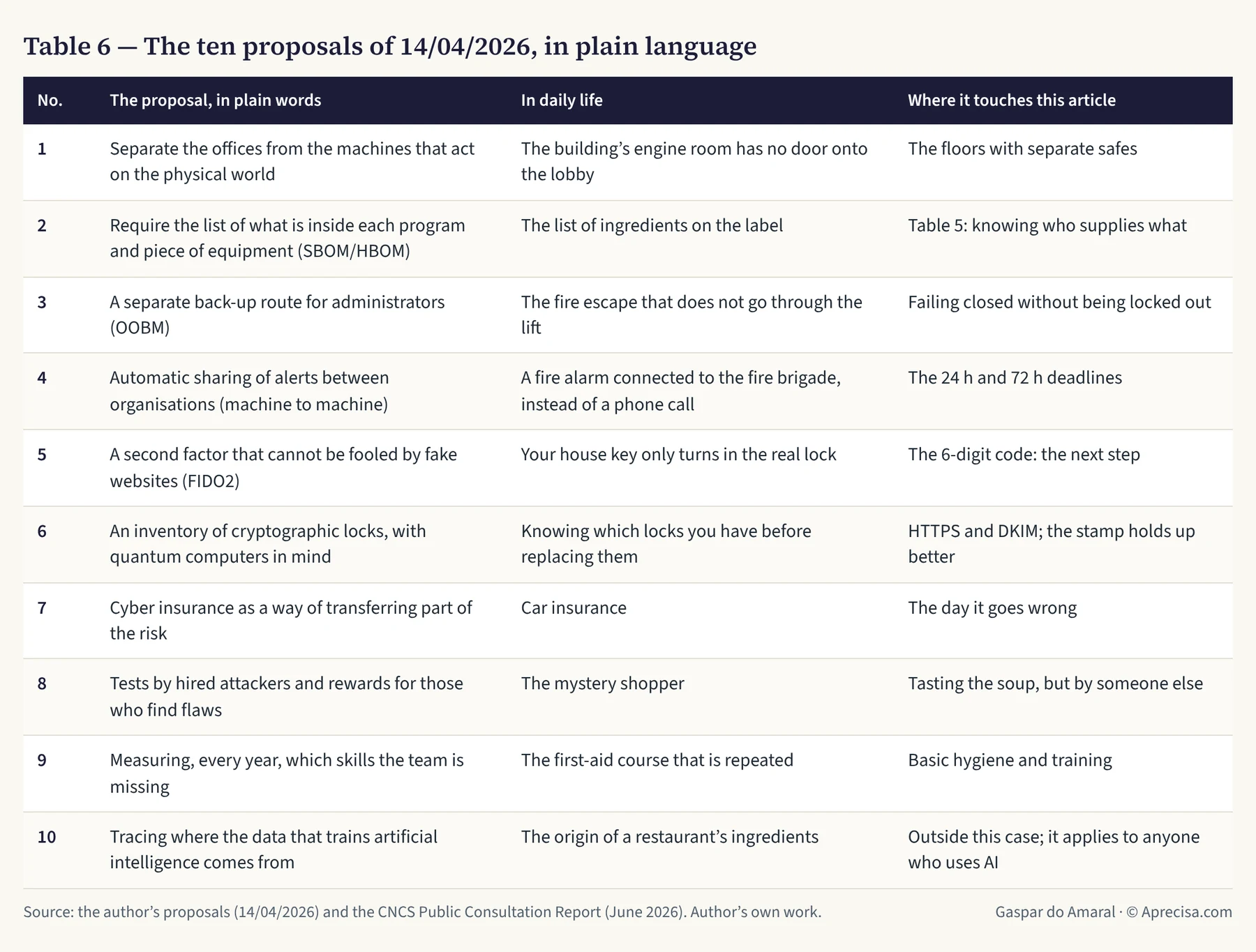
What does this mean for the reader of this article? That the law is the floor, not the ceiling. The regulator said, in so many words, that going beyond the minimum is each company’s decision. And this is where the ten proposals become useful again: not as law, but as a list of what a careful company can do on its own initiative. Table 6 explains them with the images of this article and says where each one touches the case of the floors and the safes.
Three links worth highlighting.
- Proposal 5 corrects this very article. The 6-digit code from the phone is good, but it is not the best. A fake website can ask for it and use it within the same minute, like someone overhearing a PIN said out loud. Physical security keys and phone “passkeys” (FIDO2 standards) work like a house key: they only turn in the real lock and are useless in a fake door. For anyone who administers systems, it is the next step.
- Proposal 6 looks at the safes of the future. Quantum computers, when they exist at scale, will open certain locks we use today: the ones that protect the padlock on the address (HTTPS) and the seal on the letters (DKIM). The cloakroom stamp, made with a shared secret key, holds up much better. Knowing which locks you have is the first step to replacing them in time: this is called a cryptographic inventory.
- Proposal 1 is the lesson of the floors, on the scale of a port. We separated the websites into floors, each with its own safe, so that a break-in on one does not open the others. In a port or an electrical substation, the same idea separates the offices (the Wi-Fi, the email) from the machines that move cranes, sluice gates and circuit breakers. If a virus gets in through the email, it must have no staircase down to the engine room.
To remember. The law is the floor, not the ceiling. What the regulator did not make compulsory is still good engineering, and each company can do it on its own initiative.
9. To keep in your pocket
- One address, several floors. One subdomain per audience. Each floor with its own safe.
- One official address per page, and a redirect (301) every time it changes. Published links never break.
- No key on the plans. Keys in the safe of the floor that uses them, with minimum permissions, an expiry date and two factors to create them.
- Safes fail closed. When a piece is missing, the door stays closed and the reader receives a clear message.
- The law is the floor, not the ceiling. The compulsory minimum is the starting point; the rest is decided by the consequence of each failure.
- Taste the soup before you serve it. Sunday’s mistake was only spotted because someone asked for a music pack the way any reader would. The final test is always end to end: ask, receive the email, open the link, try the shortcut and see the door closed.
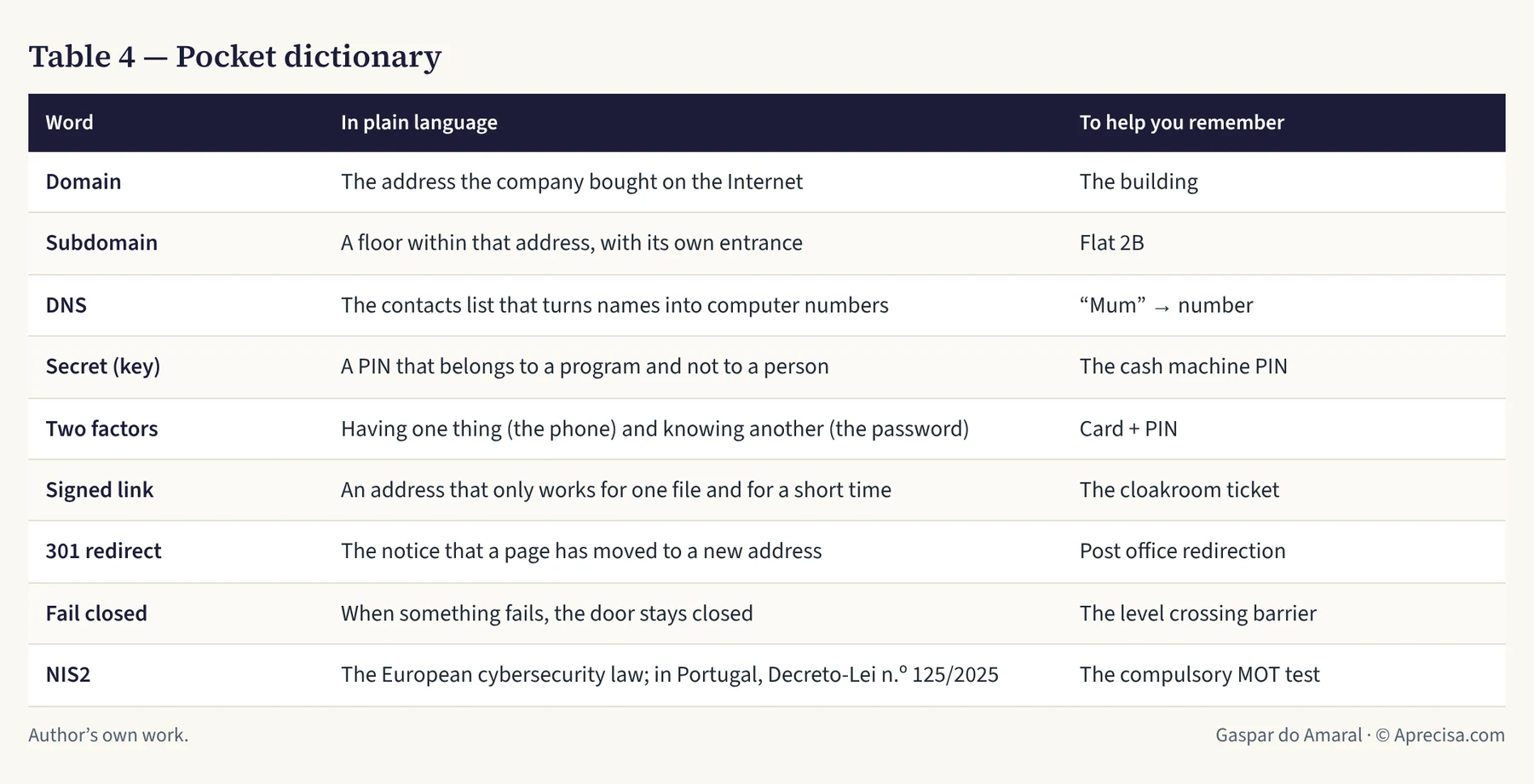
Table 4 is a pocket dictionary with the words used in this article.
None of this is unique to a small website. It is the same logic as a port, a station where a submarine cable comes ashore or the control centre of a power grid: the address is public, the doors are few and well known, each key opens only what it should, and when something fails, it fails towards the safe side.
10. The road map of this newsletter
Who it is for. For people who have to make decisions about security without being specialists: the owner of a small company, the manager who commissions a website, the technician from another field, the teacher and the student, the public decision-maker. And for companies that want to become suppliers to those the law already covers: ports, energy operators, hospitals, transport.
The promise. In each issue, one idea, one everyday image you will not forget and three things you can do tomorrow morning. No unexplained jargon, no politics and no fear as an argument: only facts, with the calculations done in plain sight.
How each issue reads. They all have the same seven parts, so that readers always know where they are:
- The story: a real case, told without company names.
- The image: the concept compared with something everybody knows.
- The calculations, when there are any, step by step, as if done by hand.
- What the law says: the point of NIS2 or of Decreto-Lei n.º 125/2025 that the topic corresponds to.
- To remember: the essentials in two sentences.
- Tomorrow morning: three concrete actions, in order of ease.
- The question: a question for readers, to carry on the conversation in the comments.
The house rules. The technical examples are always anonymous, like exemplo.pt in this issue, so that no issue can serve as a map for anyone who wants to attack someone. Suppliers appear only as examples, mixed together and in alphabetical order. Each issue comes out first on the website, with the PDF available on request by email, and then on LinkedIn, where the discussion takes place. They come out every two weeks.
The next issues. Table 7 shows a possible road map for the next six months. It follows the order of the ten NIS2 measures and takes up, one by one, the ten proposals I submitted to the CNCS: it starts with what anyone can do at home and ends with critical infrastructure.
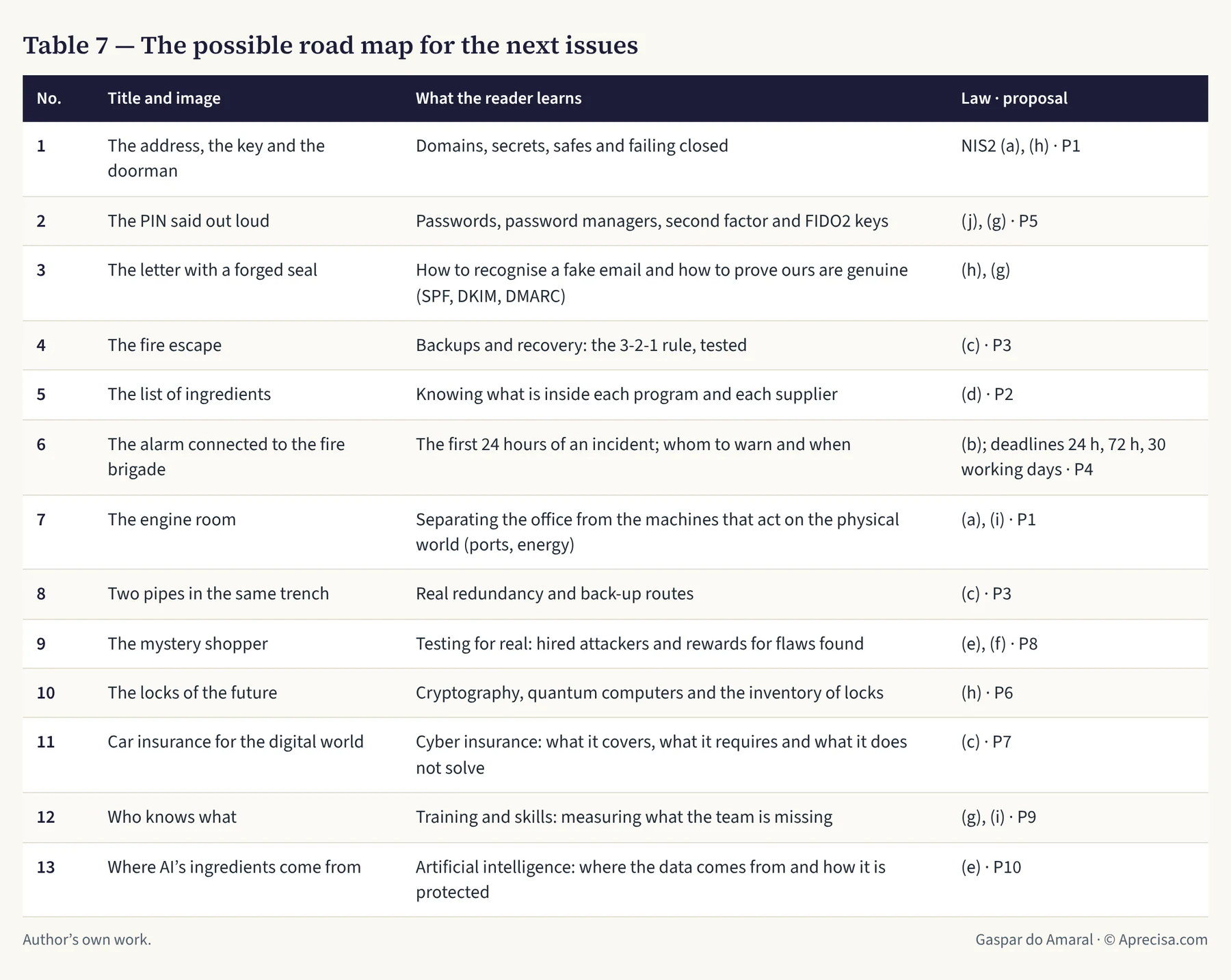
The road map is not fixed. If readers ask for one topic before another, the order changes. Which topic would you like to see in issue no. 2? Say so in the comments.
At Grupo Aprecisa.com we apply these five rules on our own websites, and we help other companies to do the same: those that have to comply with NIS2 and those that want to become suppliers to those that comply. This article opens the newsletter “A Chave e o Porteiro” (The Key and the Doorman): cybersecurity in plain language, every two weeks.
Methodological note
Verified facts. The ten measures of Article 21(2) were checked against the text of Directive (EU) 2022/2555 (OJ L 333, 27.12.2022). The dates, the notification deadlines and the fines of Decreto-Lei n.º 125/2025 were checked in two independent legal summaries (PLMJ and Cuatrecasas), and the date of entry into force in ECIJA; for any legal decision, reading the official text in the Diário da República (Portugal’s official gazette) is recommended. The author is not a lawyer; this article is technical.
Observed facts. The episode of 25 October 2026, the permissions, the validity period and the expiry through inactivity of the email sending service’s keys, the two-factor verification, the separation of secrets by project and by environment in the hosting service, and the need for a new publication for the secret to take effect were observed directly in the administration panels and in the end-to-end tests carried out by the author that day.
The signature calculation. The signature uses HMAC-SHA-256 (a signing function with a secret key), cut to 32 characters in base64url (64 symbols, 6 bits each): 32 × 6 = 192 bits; 2192 = 6.277 × 1057. Attempts in 7 days at 109 per second: 7 × 86,400 × 109 = 6.048 × 10¹⁴. Probability: 6.048 × 10¹⁴ ÷ 6.277 × 1057 = 9.6 × 10−44. The EuroMillions comparison uses 1 in 139,838,160 per entry: five weeks in a row gives (1/139,838,160)5 ≈ 1.9 × 10−41, which is about 200 times more likely than guessing the signature.
Comparison with the atoms of the Earth. The usual estimate of about 1.33 × 1050 atoms on Earth is used: 6.277 × 1057 ÷ 1.33 × 1050 ≈ 4.7 × 10⁷, that is, about 47 million planet Earths. It is an order of magnitude, to give an idea of the size.
What is not shown. For security reasons, the article does not give key values, account identifiers or internal administration addresses.
References
- Gaspar do Amaral — Da Conformidade Normativa à Resiliência Operacional: 10 Propostas para o Novo Regime de Cibersegurança (14/04/2026) — the ten proposals submitted in the public consultation (in Portuguese)
- Gaspar do Amaral — O Novo Regime de Cibersegurança: o que ficou por fazer (25/06/2026) — assessment of the CNCS Public Consultation Report: 10 “not accepted”, 6 also backed by others (in Portuguese)
- Diretiva (UE) 2022/2555 (NIS2), artigo 21.º — Medidas de gestão dos riscos de cibersegurança — text of points (a) to (j) of Article 21 (Cybersecurity risk-management measures), in English
- PLMJ — Transposição da Diretiva NIS 2: o novo Regime Jurídico da Cibersegurança — Decreto-Lei n.º 125/2025: scope, notification deadlines, fines and registration with the CNCS (in Portuguese)
- Cuatrecasas — Novo Regime Jurídico da Cibersegurança — summary of Decreto-Lei n.º 125/2025: risk management, multi-factor authentication, encryption (in Portuguese)
- ECIJA — Novo Regime Jurídico da Cibersegurança entrou em vigor em Portugal — entry into force on 3 April 2026 (in Portuguese)
The discussion is on LinkedIn (in Portuguese)
Comments on this text are made on LinkedIn, where the article was shared in Portuguese. You are welcome to write in English. Agree, disagree or add data: every well-founded objection receives a reply.
When you show the post, its content is loaded from LinkedIn. Privacy (in Portuguese)
Gaspar do Amaral · Original in Portuguese of 26 October 2026, published on this site; translation issued on 27 October 2026 · Figures and tables © Aprecisa.com · AI-assisted